Commands
Named slash commands for the configured Discord guild. There is no raw arbitrary RCON endpoint.
Command list
/pingAnyone in the configured guildCheck whether CraftCord is responding and report Discord gateway latency.
/botinfoAnyone in the configured guildShow a small embed with Python version, discord.py version, and bot uptime seconds.
/statusMember tierShow the current Minecraft server status embed for the configured server.
/listMember tierList online players by running the vanilla Minecraft list command over RCON.
/sayModerator tierBroadcast a message in-game with the vanilla say command.
/kickModerator tierKick a player from the configured Minecraft server.
/banModerator tierBan a player by name on the configured Minecraft server (vanilla name-based ban).
/pardonModerator tierRemove a player from the ban list with the vanilla pardon command.
/whitelist addModerator tierAdd a player to the whitelist on the configured Minecraft server.
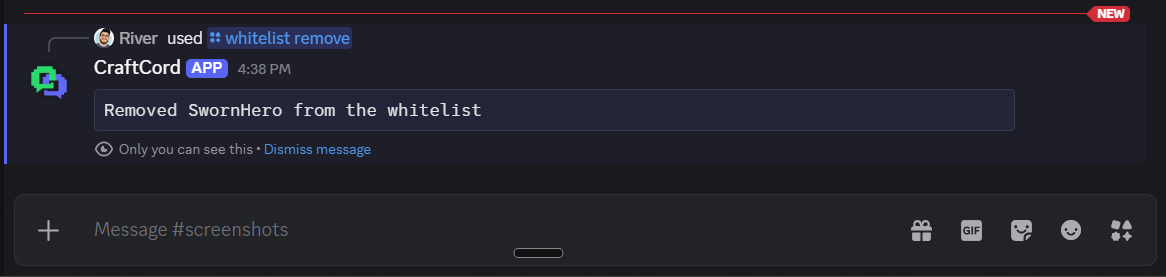
/whitelist removeModerator tierRemove a player from the whitelist on the configured Minecraft server.
/syncAdministrator tierRe-sync slash commands for the configured guild only.
Permissions
Checks run after the configured-guild boundary. Within that guild, the owner and anyone with the Discord Administrator permission bypass role-id checks for the named commands below. Owners and Administrators in other Discord servers are refused. DMs are refused.
- Anyone in the configured guild —
/ping,/botinfo - Member tier — configured admin, mod, or member role (plus privileged members):
/status,/list - Moderator tier — configured admin or mod role (plus privileged members):
/say,/kick,/ban,/pardon, whitelist commands - Administrator tier — configured admin role (plus privileged members):
/sync
Exact denial strings include “You don't have permission to use this command.”, “This bot only works in its configured Discord server.”, and “This command must be used in a server.”

/ping
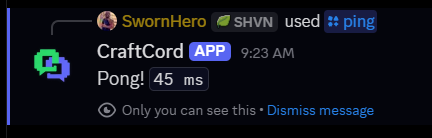
Check whether CraftCord is responding and report Discord gateway latency.
- Syntax
/ping- Who can run it
- Anyone in the configured guild
- Arguments
- No arguments.
- Example
/ping- Expected success
- Ephemeral reply such as “Pong! 45 ms” with the current WebSocket latency.
- Common failures
- Outside the configured guild or in a DM, Discord shows an ephemeral denial such as “This bot only works in its configured Discord server.” or “This command must be used in a server.”
/botinfo
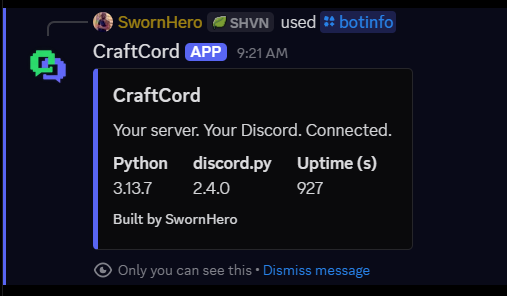
Show a small embed with Python version, discord.py version, and bot uptime seconds.
- Syntax
/botinfo- Who can run it
- Anyone in the configured guild
- Arguments
- No arguments.
- Example
/botinfo- Expected success
- Ephemeral embed titled with CraftCord branding and runtime fields.
- Common failures
- Outside the configured guild or in a DM, Discord shows an ephemeral denial such as “This bot only works in its configured Discord server.” or “This command must be used in a server.”
/status
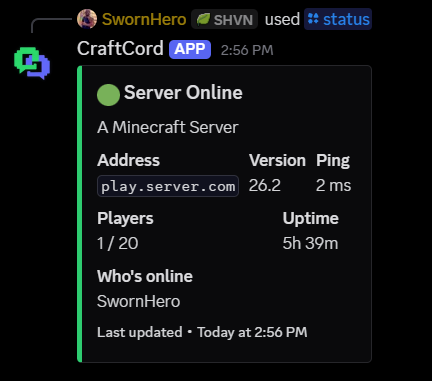
Show the current Minecraft server status embed for the configured server.
- Syntax
/status- Who can run it
- Member tier
- Arguments
- No arguments.
- Example
/status- Expected success
- A status embed with online/offline state, MOTD, players, and related fields.
- Common failures
- Without member-tier access, Discord shows “You don't have permission to use this command.” RCON or ping problems surface through the offline/unreachable status presentation rather than a raw host dump.
/list
List online players by running the vanilla Minecraft list command over RCON.
- Syntax
/list- Who can run it
- Member tier
- Arguments
- No arguments.
- Example
/list- Expected success
- Public follow-up containing the cleaned RCON
listoutput in a code block, for exampleThere are 1 of a max of 20 players online: SwornHero. - Common failures
- Without member-tier access: “You don't have permission to use this command.” If RCON fails: “Could not reach the Minecraft server. Try again later.”

/say
Broadcast a message in-game with the vanilla say command.
- Syntax
/say message:<text>- Who can run it
- Moderator tier
- Arguments
- Required
message— text to broadcast. Double quotes in the message are replaced with single quotes before the RCON call. - Example
/say message:Town hall build starts in 10 minutes- Expected success
- Ephemeral reply: “Message sent.” Players in-game see the message as a
[Broadcast]chat line. - Common failures
- Without mod-tier access: “You don't have permission to use this command.” If RCON fails: “Could not reach the Minecraft server. Try again later.”

/kick
Kick a player from the configured Minecraft server.
- Syntax
/kick player:<name> [reason:<text>]- Who can run it
- Moderator tier
- Arguments
- Required
player— Java username (1–16 letters, numbers, or underscores). Optionalreason— defaults to “Kicked by a moderator”; trimmed, control characters collapsed, capped at 200 characters. - Example
/kick player:Alex reason:AFK during event- Expected success
- Ephemeral code block with the cleaned RCON kick response, for example
Kicked SwornHero: Test, or(no output)when Minecraft returns an empty body. - Common failures
- Invalid
player: “Invalid Minecraft username. Use 1-16 letters, numbers, or underscores.” Without mod-tier access: “You don't have permission to use this command.” If RCON fails: “Could not reach the Minecraft server. Try again later.”

/ban
Ban a player by name on the configured Minecraft server (vanilla name-based ban).
- Syntax
/ban player:<name> [reason:<text>]- Who can run it
- Moderator tier
- Arguments
- Required
player— Java username (1–16 letters, numbers, or underscores). Optionalreason— defaults to “Banned by a moderator”; trimmed, control characters collapsed, capped at 200 characters. - Example
/ban player:GriefBot reason:Repeated griefing- Expected success
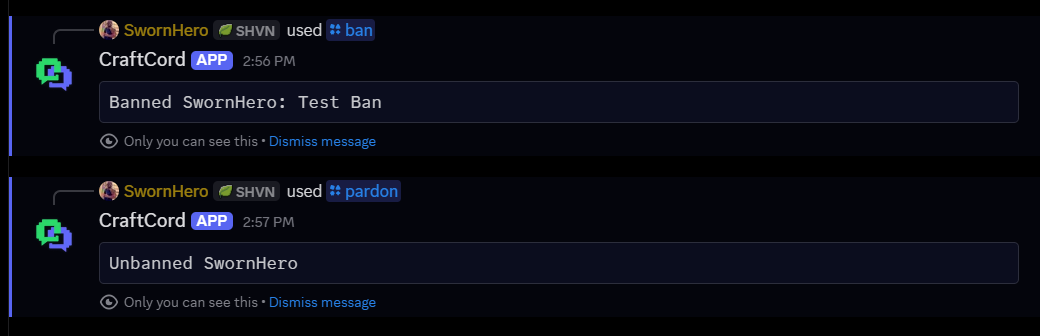
- Ephemeral code block with the cleaned RCON ban response, for example
Banned SwornHero: Test Ban, or(no output)when Minecraft returns an empty body. - Common failures
- Invalid
player: “Invalid Minecraft username. Use 1-16 letters, numbers, or underscores.” Without mod-tier access: “You don't have permission to use this command.” If RCON fails: “Could not reach the Minecraft server. Try again later.”
/pardon
Remove a player from the ban list with the vanilla pardon command.
- Syntax
/pardon player:<name>- Who can run it
- Moderator tier
- Arguments
- Required
player— Java username (1–16 letters, numbers, or underscores). No reason argument. - Example
/pardon player:Alex- Expected success
- Ephemeral code block with the cleaned RCON pardon response, for example
Unbanned SwornHero, or(no output)when Minecraft returns an empty body. - Common failures
- Invalid
player: “Invalid Minecraft username. Use 1-16 letters, numbers, or underscores.” Without mod-tier access: “You don't have permission to use this command.” If RCON fails: “Could not reach the Minecraft server. Try again later.”
/whitelist add
Add a player to the whitelist on the configured Minecraft server.
- Syntax
/whitelist add player:<name>- Who can run it
- Moderator tier
- Arguments
- Required
player— Java username (1–16 letters, numbers, or underscores). - Example
/whitelist add player:Jamie- Expected success
- Ephemeral code block with the cleaned RCON whitelist response, for example
Added SwornHero to the whitelist. - Common failures
- Invalid
player: “Invalid Minecraft username. Use 1-16 letters, numbers, or underscores.” Without mod-tier access: “You don't have permission to use this command.” If RCON fails: “Could not reach the Minecraft server. Try again later.” Whitelist enforcement also depends on Minecraftwhite-list=trueor/whitelist on.

/whitelist remove
Remove a player from the whitelist on the configured Minecraft server.
- Syntax
/whitelist remove player:<name>- Who can run it
- Moderator tier
- Arguments
- Required
player— Java username (1–16 letters, numbers, or underscores). - Example
/whitelist remove player:Jamie- Expected success
- Ephemeral code block with the cleaned RCON whitelist response, for example
Removed SwornHero from the whitelist. - Common failures
- Invalid
player: “Invalid Minecraft username. Use 1-16 letters, numbers, or underscores.” Without mod-tier access: “You don't have permission to use this command.” If RCON fails: “Could not reach the Minecraft server. Try again later.”
/sync
Re-sync slash commands for the configured guild only.
- Syntax
/sync- Who can run it
- Administrator tier
- Arguments
- No arguments.
- Example
/sync- Expected success
- Ephemeral reply: “Synced N commands to the configured guild.” (for example “Synced 10 commands to the configured guild.”)
- Common failures
- Without admin-tier access: “You don't have permission to use this command.” Outside the configured guild: “This bot only works in its configured Discord server.”