Run the bridge yourself.
CraftCord is a Python bot that connects one Discord server to one Minecraft Java server per installation. This guide gets a development checkout running on your computer or a cloud host.
Live-tested with Python 3.13.7 on Windows against a vanilla English Minecraft Java 26.2 server running Temurin 25.0.1, using a local log file. Pterodactyl log streaming and other Python versions or operating systems have not been live-tested. Prefer a Python 3.13 runtime when a host panel offers one. The source repository is private until public release, so git clone works only for people with repository access.
The self-hosted model
CraftCord runs on your computer or hosting, using credentials and configuration you control. The website never asks you to enter tokens, passwords, or server credentials. Keep those values in your local environment or host panel.
Where to run it
Start on your own machine while you configure channels and RCON. Leave it running in the cloud when you want the bridge online after you close your PC.
PebbleHost is recommended for Discord bot hosting. Use their Python Discord bot hosting.
- Upload the project files without
.venv/,__pycache__/,data/, or.env. - Create
.envon the host with the file manager or Startup / Environment tab. - Set the startup command to
python main.py. - Same machine as the Minecraft server: set
LOG_SOURCE=localand pointMC_LOG_PATHat/home/container/logs/latest.log. - Different hosts: set
LOG_SOURCE=pterodactyland fill in the panel URL, server id, and client API key. See Troubleshooting if log access fails.
BisectHosting and SparkedHost are other Python-capable Discord bot hosts. The pattern is the same: upload the project, set environment variables, start with python main.py.
What you need
- Your own Discord application and bot token.
- Invite the bot to only the Discord server in
DISCORD_GUILD_ID, with View Channels, Send Messages, Embed Links, Read Message History, Manage Messages, and Add Reactions. Turn Public Bot off unless you have a deliberate multi-install plan. - RCON access to your Minecraft server.
- Local access to
latest.log, or compatible Pterodactyl log access. - Python 3.13 runtime and a place to run the process.
Install
Clone the current development tree (no published release tag yet), create a virtual environment, install the locked requirements, then copy the example environment file.
git clone https://github.com/golso4243/CraftCord.git
cd CraftCord
py -3.13 -m venv .venv
.venv\Scripts\Activate.ps1
pip install -r requirements.lock
Copy-Item .env.example .env
python main.pygit clone https://github.com/golso4243/CraftCord.git
cd CraftCord
python3 -m venv .venv
source .venv/bin/activate
pip install -r requirements.lock
cp .env.example .env
python main.pyConfigure locally
Open .env and configure your Discord token, RCON connection, channels, roles, and log source. Never paste those credentials into this website.
Use the configuration reference for every supported environment variable, defaults, and a copyable minimal .env. The GitHub README remains a secondary source for the same details.
Message Content Intent is required only when CHAT_CHANNEL_ID is set, so the Discord → Minecraft bridge can read channel messages. Slash commands and log mirroring work with default intents when the chat bridge is off. See Message Content troubleshooting if the bridge stays silent.
Chat and event channels need their own IDs. They do not fall back to the console channel. Console mirroring stays off unless ENABLE_CONSOLE_MIRROR=true, and that channel should stay staff-only.
Status uptime is observed RCON reachability, not a Minecraft process clock. On managed hosts the public game port can still answer a server-list ping while the Minecraft process is restarting, so the status embed probes RCON instead. If startup logs RCON unreachable, follow the RCON checklist.
How messages appear
Discord chat is sent in-game as [Discord] DisplayName: message. [Discord] is blue. The display name, colon, and message are white. The name is that member’s server display name, including a nickname when they have one. Only members with an allowed role, the server owner, or an Administrator can send chat into Minecraft.
Minecraft chat is posted in Discord by your bot. The bot’s name and avatar stay above the message, and the body reads [Minecraft] Player: message. The tag and username are bold. The colon and message are not.
Joins, leaves, deaths, advancements, challenges, and goals can post as separate colored embeds. The events channel can be the same channel as chat.
The relay reads vanilla log lines such as <Player> Hello. A chat plugin that adds ranks or prefixes to that line may not be recognized.
Mentions, custom emoji, stickers, and attachments become plain text. Discord markdown is kept as written, and Discord messages longer than 200 characters are shortened.
Start and stop
Run python main.py from the activated environment. Stop the process with Ctrl+C. On a host panel, use that panel’s stop control.
A healthy start loads each cog, reports RCON ready, syncs the slash commands to your guild, and logs in. The PyNaCl warning is about voice support, which CraftCord does not use.
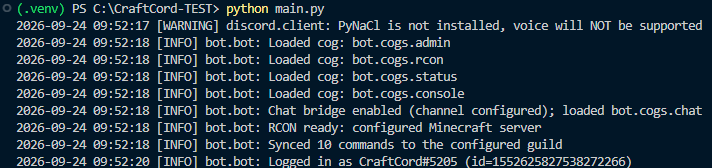
Next: read the configuration reference, skim commands, and keep troubleshooting handy. The authoritative README on GitHub remains available as a secondary reference.